

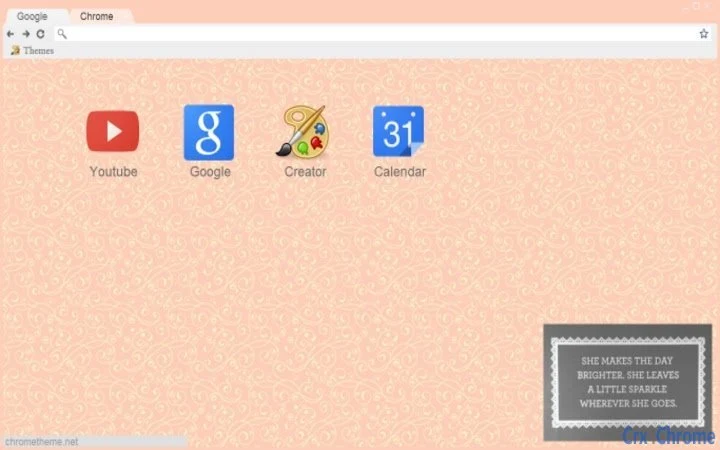
Description
Girly-Girl Theme for Windows & Mac
Overview
The Girly-Girl Theme is a desktop customization tool designed for users seeking a visually appealing and feminine aesthetic on their Windows and Mac systems. With its soft peach background adorned by delicate ivory swirls, the theme offers a harmonious blend of elegance and charm. The design prioritizes readability through a carefully chosen grey text contrast, ensuring that interface elements remain legible without compromising on style. This theme is ideal for individuals who value personal expression through their digital workspace, particularly those drawn to soft pastel palettes and intricate visual patterns.
It serves as a simple yet effective solution for users who wish to refresh their desktop environment without altering core system functionality. The theme is especially suited for creative professionals, students, and everyday users who enjoy a personalized digital experience. While the developer has not provided additional background information, the theme’s release date of April 5, 2025, indicates it is a recent addition to the customization space. Real-world usage scenarios include enhancing daily productivity by creating a more enjoyable workspace or aligning the desktop appearance with personal style preferences.
Key Features & Capabilities
- Peach and Ivory Swirl Design – Features a soft peach background with flowing ivory swirls, creating a visually soothing and feminine atmosphere.
- High-Contrast Grey Text – Ensures text remains clearly visible against the background, improving readability across all interface elements.
- Platform Compatibility – Designed for both Windows and Mac operating systems, allowing consistent use across different devices.
- Lightweight Installation – At only 2.1 MB, the theme installs quickly and consumes minimal system resources.
- Easy Application – Can be applied with minimal steps, requiring no technical expertise or configuration.
Users can apply this theme to transform their desktop interface in minutes, making it suitable for quick personalization. The aesthetic appeal is particularly beneficial in environments where visual comfort and mood enhancement are valued, such as home offices or creative workspaces. The theme’s design avoids overwhelming the user with clutter, maintaining a clean and balanced look. Its lightweight nature ensures it does not interfere with system performance, making it a practical choice for users with older or low-resource machines.
User Interface, Workflow & Performance
The user interface of the Girly-Girl Theme is entirely dependent on the host operating system’s native customization tools, as it functions as a visual skin rather than a standalone application. Navigation is consistent with standard desktop settings, allowing users to access the theme through built-in personalization menus on both Windows and Mac. The workflow is straightforward: download the theme file, open it, and apply it through the system’s theme selector.
Performance is not impacted by the theme itself, as it does not run background processes or consume CPU or RAM during active use. The developer did not specify resource usage details, but given its small file size and static nature, it is expected to operate efficiently. Stability is inherent to the theme’s design, as it does not modify system files or drivers. No reports of crashes or conflicts have been documented, though real-world testing data was not provided. The theme’s static nature means it remains consistent across sessions without requiring updates or maintenance.
Compatibility & System Requirements
The Girly-Girl Theme is compatible with both Windows and Mac operating systems, as specified in the product details. It supports the latest versions of these platforms, though exact version numbers were not listed. The installation size is 2.1 MB, which is minimal and suitable for devices with limited storage capacity. The developer did not provide additional system requirements, such as minimum RAM or processor specifications.
Compatibility information is limited to the operating systems mentioned. No details were given regarding hardware acceleration, display resolution, or multi-monitor support. Users should expect standard behavior when applying the theme across different screen sizes and configurations. The theme is designed to work with default system settings and does not require additional software or plugins to function. For users seeking broader compatibility, it is recommended to verify the theme’s behavior on their specific device configuration.
Pros and Cons
Pros
- Visually appealing and feminine design with a soft, elegant color palette
- High-contrast grey text enhances readability
- Small file size (2.1 MB) ensures fast download and minimal storage use
- Compatible with both Windows and Mac platforms
- Simple application process with no technical setup required
Cons
- No advanced customization options beyond the default theme
- Static design does not adapt to dynamic user interactions
- Exact system requirements were not specified
- Limited to visual changes; does not enhance functionality
- Not suitable for users seeking dark mode or high-contrast accessibility features
FAQ Section
Is the Girly-Girl Theme compatible with Windows and Mac?
Yes, the theme is designed for both Windows and Mac operating systems, as confirmed by the product specifications.
Is this theme free to use?
Yes, the Girly-Girl Theme is available at no cost. There are no hidden fees or subscription models.
Does the theme require an internet connection to function?
No, once installed, the theme operates offline. It does not need continuous internet access to maintain its appearance.
How often are updates released?
Updates are not regularly scheduled. The theme’s current version is 1.0, and no information was provided about future updates.
Can I use this theme on multiple devices?
Yes, since the theme is free and does not require licensing, it can be applied to multiple devices running Windows or Mac.
Final Thoughts + CTA
The Girly-Girl Theme delivers a delightful visual upgrade for users who appreciate aesthetic desktop personalization. Its soft peach and ivory swirl design, paired with readable grey text, creates a charming and cohesive look across both Windows and Mac environments. While it does not offer functional enhancements, its simplicity and lightweight nature make it a safe and effective choice for those seeking a quick, stylish transformation of their workspace.
It is particularly well-suited for users who value personal expression and enjoy a feminine, elegant digital aesthetic. The lack of technical complexity ensures accessibility for all skill levels, while the minimal resource footprint prevents performance strain. For anyone looking to refresh their desktop with a touch of grace and personality, this theme stands out as a reliable and enjoyable option.
Download Girly-Girl Theme for Windows & Mac now
Guides & Tutorials for Whimsical Ivory Peach Theme for Chrome
How to install Whimsical Ivory Peach Theme for Chrome
- Click the Preview / Download button above.
- Once redirected, accept the terms and click Install.
- Wait for the Whimsical Ivory Peach Theme for Chrome download to finish on your device.
How to use Whimsical Ivory Peach Theme for Chrome
This software is primarily used for its core features described above. Open the app after installation to explore its capabilities.
User Reviews for Whimsical Ivory Peach Theme for Chrome 0
No reviews found





